![boardroom-dusit-central-park-_-ph-blog-_-cl-2026.png]()
A prospective client's team of six is coming to Metro Manila next Thursday to hear your proposal, and their regional director will join by video from abroad. You have no meeting room of your own, and the booking page you have open offers a day office, a meeting room and a third, larger option.
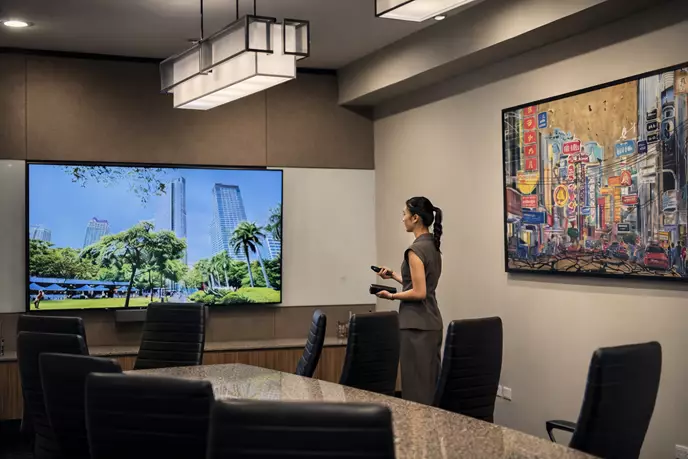
That third option is the boardroom: a formal meeting room arranged around one large table. Collins defines it as a room where a company's board meets, but a business without a board can hire one for any meeting where the guests are senior, and the stakes are high. Whether this proposal needs one depends on the guest list, the technology the meeting relies on and how private the conversation has to be.
What Sets the Room Apart
Size is the obvious difference from a meeting room or a day office. Four other features shape how a meeting in it goes.
One Table, Everyone Facing In
The room is organised around a single large table, with everyone seated at it. Each person can see the others' faces, which helps when you want every guest to contribute and need to read reactions as terms or figures come up.
A Closed Door for Conversations That Stay in the Room
Financial results, salary discussions and unannounced plans should not carry into a corridor. A room with solid walls and a door that closes, away from reception and busy walkways, makes it easier for people to speak freely. If the room has glass walls, check for blinds or frosted panels before putting anything confidential on the screen.
Screens, Cameras and Microphones That Reach the Far End
A long table can be hard on anyone joining by video. A single camera may struggle to show every face clearly, and people seated far from the microphone can sound distant on the call. Before booking, it is worth asking whether the screen can be read from the far end of the table, whether the camera takes in every seat and whether the microphones cover the whole table.
A Setting That Signals the Meeting Matters
A formal room can tell visitors that the meeting has been planned with care, and that impression may carry into the discussion. The effect has limits, though: a formal setting cannot make up for a weak proposal.
Boardroom, Meeting Room or Day Office?
Each room type suits a different kind of meeting.
|
|
Boardrooms
|
Meeting rooms
|
Day offices
|
|
Best suited to
|
Formal meetings with senior guests or high stakes
|
Team discussions, workshops and routine client catch-ups
|
One-to-one conversations and quiet, focused work
|
|
Group
|
Usually the largest of the three, all seated at one table
|
A small working team
|
One person or a very small group
|
|
Layout
|
One large table with everyone around it
|
A smaller table
|
A desk and a few chairs
|
|
Technology
|
Typically a large screen, video conferencing and microphones
|
Usually simpler: a screen, sometimes with video calling
|
Varies by provider
|
|
Feel
|
Formal
|
Working
|
Private and practical
|
Booking the largest room for prestige alone can work against you. A handful of people spread along a long table may feel scattered, and the formality can make a relaxed catch-up feel stiff. For an internal or informal discussion, the smaller table in a meeting room keeps everyone within easy reach of the conversation.
Meetings That Justify the Bigger Room
The extra space and formality make most sense when the people across the table matter to your business and the decision cannot easily be revisited. A pitch to investors or a lender fits that description, as does a proposal to a prospective client's team or a negotiation with a supplier or joint-venture partner over contract terms. Quarterly or annual reviews with partners, or a visit from a regional head, belong in the same group.
A panel interview for a senior hire also uses the table well, since the candidate faces the whole panel at once. So does a half-day strategy session with your own leadership team, particularly when figures will stay on screen for hours. For businesses that have a board, the room is also where the board meets.
Hiring One for a Few Hours: What to Check Before You Book
In a hired room, you are working with someone else's equipment and staff, so a few checks in advance help you avoid an awkward start:
- seats for everyone, plus a spare in case a guest brings a colleague
- screen sharing, tested with your own laptop, adapters and the video-call platform your guests will use
- who greets your guests, and how they get from the building entrance to the room
- water, coffee or lunch, and how far ahead it needs to be ordered
- enough time in the booking to set up before guests arrive and to finish without watching the clock
- a named person to call if the screen or the connection fails on the day
Rooms like these can be hired by the hour or by the day from flexible office providers and business centres, so a small business can book one only when a meeting needs it.
Servcorp, on Level 24 of the Philippine Stock Exchange Tower (PSE Tower) at One Bonifacio High Street in Bonifacio Global City, is one such provider. It offers boardrooms for 10 to 12 people, meeting rooms for 4 to 6 and day offices for 1 to 3, each bookable for one-off use with no lock-in contract. Receptionists greet guests on arrival; the video conferencing systems are equipped with Zoom and Teams, and face-to-face IT support, secretarial help and catering are available. You can compare the rooms at PSE Tower in BGC and book the one that suits the meeting.
Letting the Guest List Decide
Count everyone who will take part, including anyone joining on screen, and note what will be shown and what must stay confidential. With those two lists in hand, the choice between the rooms is usually clear. When two rooms seem equally suitable, choose the one in which every guest, in the room or on the call, can see and hear everyone else.
Frequently Asked Questions